
- 1. Make sure Activation Lock is removed
- 2. Confirm the watch can begin pairing with your iPhone
- 3. Identify the exact generation and case size
- 4. Check battery health, not only the battery percentage
- 5. Inspect screen, case and touch response
- 6. Test Digital Crown, side button and haptics
- 7. Verify the watch charges with a compatible charger
- 8. Understand GPS vs. GPS + Cellular
- 9. Do not assume an older watch is waterproof
- 10. Compare the full package, not just the watch
A used Apple Watch can be a smart way to try activity tracking, notifications and Apple’s watch experience without paying a new-device price. But a smartwatch has a major buying risk that is easy to overlook: an attractive watch can still be unusable if it remains linked to the previous owner’s Apple Account.
Start with Activation Lock and pairing, then inspect battery condition, hardware and accessories. This checklist is useful for an in-person sale and as a list of questions to ask before purchasing online.
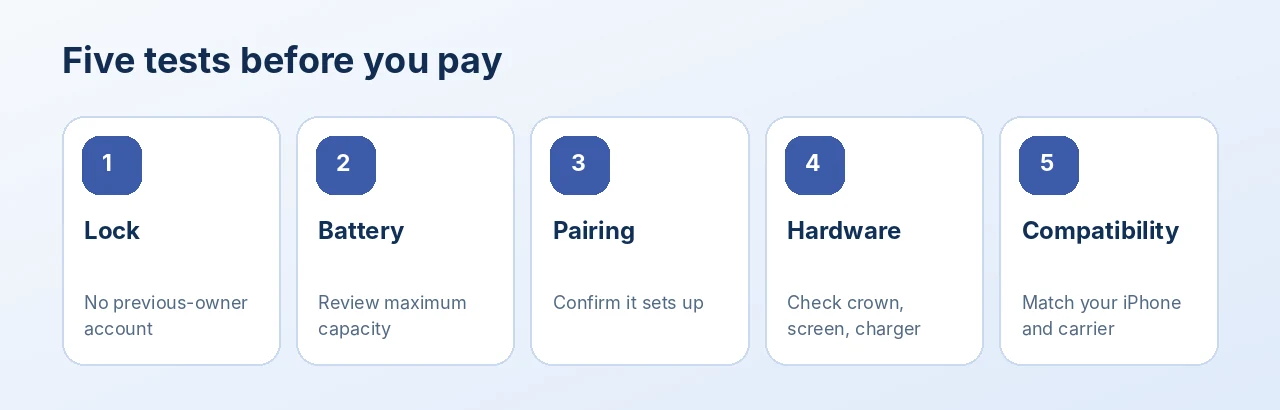
Illustration: an editorial quick-reference guide, not a device settings screenshot.
1. Make sure Activation Lock is removed
Apple’s Activation Lock helps prevent a lost or stolen watch from being paired with a new iPhone without the original owner’s credentials. A basic factory reset on the watch alone does not necessarily remove this lock.
Ideally, the seller should unpair the Apple Watch using the Watch app on their paired iPhone and enter the Apple Account password when requested. If the seller no longer has the paired iPhone, Apple provides a legitimate web-based removal method for the owner.
Do not buy a watch that asks for the previous owner’s Apple Account information during setup. A verbal promise to remove the lock later is not the same as successful verification.
2. Confirm the watch can begin pairing with your iPhone
If buying locally, bring your own compatible iPhone and test the setup flow after the seller removes Activation Lock. Starting the pairing process provides more confidence than merely seeing the watch power on. Finish or cancel setup according to the agreement with the seller, and do not enter private account credentials on another person’s phone.
For online purchases, ask the seller for a clear statement that the watch has been unpaired, erased and removed from the previous account. Review the return policy in case it fails to pair when received.
3. Identify the exact generation and case size
“Apple Watch” is not a complete model description. Check the generation (such as Series, SE or Ultra family), the case size and whether the device is GPS or GPS + Cellular. These details affect feature availability, band compatibility, software support and price.
If you are comparing similar-looking models, confirm the actual model information in Settings when possible and match it to the seller’s listing. Do not assume that all watches in the same case size have identical features.
4. Check battery health, not only the battery percentage
The charge level on the watch face shows how full the battery is right now. Battery Health reflects how much capacity remains compared with when new. On supported software, open Settings > Battery > Battery Health and look for Maximum Capacity and any service message.
A watch can show 100% charge but have significantly reduced long-term battery capacity. There is no single percentage that guarantees a full day of use for everyone: workouts, always-on display, cellular activity and watch age can change runtime. If service is recommended, estimate the additional cost before deciding.
5. Inspect screen, case and touch response
Look at the display while it is on and off. Scratches may be merely cosmetic, but a crack, black area, unresponsive touch region or lifting display deserves a much closer look. Swipe across the screen and open several apps to test touch response.
Check the case edges and rear sensor area. Evidence of impact or heavy wear should be described accurately, especially when a buyer expects the watch to be worn daily.
6. Test Digital Crown, side button and haptics
Rotate and press the Digital Crown, then test the side button. Controls should respond consistently and should not feel jammed. Try a normal watch vibration or notification if possible; unexpected rattling, sticking or nonresponsive controls are warning signs.
7. Verify the watch charges with a compatible charger
Ask whether a charging puck or power adapter is included; packaging varies across used listings. Place the watch on a compatible charger and confirm it recognizes charging. A brief test will not establish total battery life, but it can reveal a missing accessory or charging problem.
8. Understand GPS vs. GPS + Cellular
A GPS + Cellular model does not automatically mean cellular service is active or available. Carrier support, plan fees, region and model compatibility matter. If you only need a watch that works alongside your iPhone, a GPS model may cover your needs. If you want cellular functionality away from your phone, confirm support with your carrier before buying.
9. Do not assume an older watch is waterproof
Apple Watch models have different water-resistance ratings, and water resistance can decline with normal wear or damage. A used watch that survived one swim is not automatically suitable for every water activity. Check the exact model’s guidance and be especially cautious if the case, seals or display have been repaired.
10. Compare the full package, not just the watch
Review the band size and condition, charger inclusion, cosmetic wear, battery information, software compatibility and return terms. A cheaper watch without a usable charger or with a severe battery issue may cost more to enjoy than a cleaner, better-documented alternative.
Frequently asked questions
Can I remove Activation Lock on an Apple Watch I bought?
The previous owner must remove it using their Apple Account or a legitimate Apple process. A factory reset alone may not disable Activation Lock. Avoid unofficial bypass claims.
Should I buy a used Apple Watch without a charger?
It can be reasonable if the seller accurately discloses the missing charger and you account for the cost. Confirm the watch itself charges if possible.
Does GPS + Cellular mean the watch will work on any U.S. carrier?
No. Confirm carrier, region, model and plan compatibility before paying extra for cellular capability.
Is the screen condition more important than battery health?
Both matter. Screen damage can affect usability and repair cost; an aging battery affects daily runtime. Activation Lock and pairing should be verified before either.
A checklist can save more than money
A used Apple Watch is a good purchase only when it can actually pair, charge and serve your daily needs. Review the exact model and honest condition notes, then browse available smartwatches at TamDo.us to compare options.